
How to Use the ChinLink Data Integration Platform to Connect to SQL Server 2008 R2
Modify JRE Security Configuration
SQL Server 2008 R2 uses TLS 1.0, while the JRE defaults to using TLS 1.2. Therefore, it is necessary to modify the JRE security configuration; otherwise, an error will occur. Find ${JRE_HOME}\lib\security\java.security in the JRE installation directory.
bash
// Before modification
jdk.tls.disabledAlgorithms=SSLv3, TLSv1, TLSv1.1, RC4, DES, MD5withRSA, DH keySize < 1024, \
    EC keySize < 224, 3DES_EDE_CBC, anon, NULL

// After modification
jdk.tls.disabledAlgorithms=RC4, DES, MD5withRSA, DH keySize < 1024, \
    EC keySize < 224, 3DES_EDE_CBC, anon, NULL
Modify the Startup Configuration File
Windows
Modify ${CHINLINK_HOME}\windows.service.xml, and thrn restart ChinLink Service.
bash
// Before modification
<env name="JAVA_OPTS" value="-Dfile.encoding=UTF-8 -Duser.timezone=Asia/Shanghai"/>
// After modification
<env name="JAVA_OPTS" value="-Dfile.encoding.UTF-8 -Duser.timezone=Asia/Shanghai -Djsse.enableCBCProtection=false"/>
Modify ${CHINLINK_HOME}\.configure.cmd, and thrn restart ChinLink Service.
bash
// Before modification
@SET JAVA_OPTS=-Dfile.encoding.UTF-8 -Duser.timezone=Asia/Shanghai
// After modification
@SET JAVA_OPTS=-Dfile.encoding.UTF-8 -Duser.timezone=Asia/Shanghai -Djsse.enableCBCProtection=false
Linux
Modify ${CHINLINK_HOME}/.configure.sh, and thrn restart ChinLink Service.
bash
// Before modification
export JAVA_OPTS="-Dfile.encoding=UTF-8 -Duser.timezone=Asia/Shanghai"
// After modification
export JAVA_OPTS="-Dfile.encoding.UTF-8 -Duser.timezone=Asia/Shanghai -Djsse.enableCBCProtection=false"
Modify Configuration Parameters
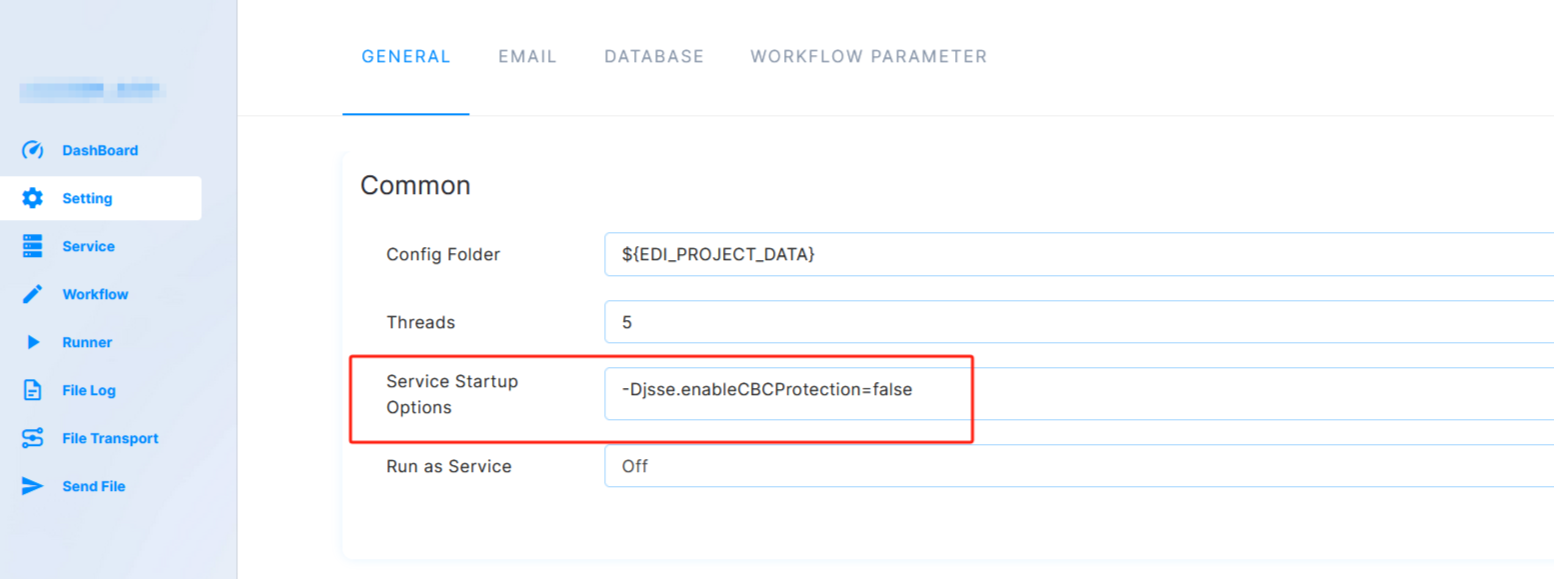
Open the project > Settings > Main Settings > Service Startup Options, and add -Djsse.enableCBCProtection=false.
Precautions
When setting the ConnectionString, please add the trustservercertificate=true; parameter by default. 